SORVA Work · Collection 01
JOB QUOTE &
PROFIT CHECK
A job can look profitable until additional hours and costs add up. Compare what your quote could leave you under different time scenarios, so you can price with a clearer picture before accepting the work.
Secure checkout through Payhip. Download access is provided after purchase.
ONCE
WHAT IT DOES.
One clear surplus figure
Enter your quote and main cost categories to see the money that may remain after those costs.
Time makes a difference
Compare expected labor hours with longer-job scenarios and see how your hourly surplus shifts.
Set your own target
Use a target hourly allowance to compare a scenario with what you'd like to earn.
Keep the job details
Use the product's export and reopen features to save a job file for later.
WHAT YOU SEE
IS WHAT YOU GET.
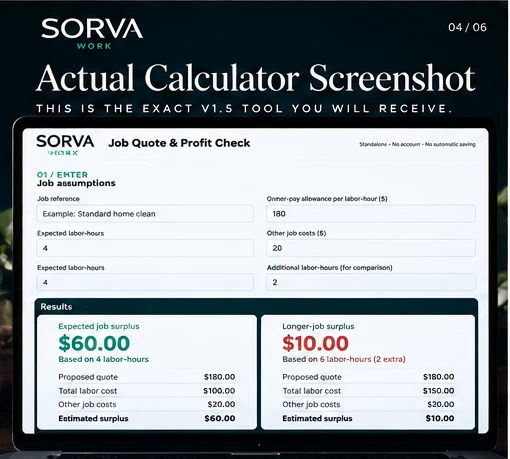
A real image of SORVA's standalone Job Quote & Profit Check calculator. The preview below is a separate fictional sample, not a copy of customer data.
TRY IT WITH A FICTIONAL JOB.
Try a sample job with direct inputs. Change the quote, hours, or allowances and compare the estimated surplus immediately. No information is saved.
Enter your job figures. Compare the expected schedule with a job that takes extra hours, and see what that means for estimated surplus.
With two more labor hours, the example leaves less surplus.
Illustration only. Not accounting, tax, or guaranteed profit advice. This demo doesn't save or submit information.
WHAT'S IN THE ZIP.
- Interactive Job Quote & Profit Check HTML calculator
- Quick-start PDF guide
- Example JSON job file
- Read Me & Product Limitations notes
This is a standalone browser tool, not an Excel workbook or cloud subscription.
OPEN IT IN THREE STEPS.
Download and unzip the folder sent after purchase.
Open the HTML calculator in a compatible web browser.
Enter your quote, costs and expected hours. Export a job file if you want to keep it.
Assumptions & limits
Figures are estimates based on the numbers entered. The tool doesn't read invoices, calculate tax or guarantee actual earnings. Check the included documentation for full limitations and device compatibility.
License, access & updates
This is a one-time purchase for use according to the included license. Delivery and recovery are handled through the original purchase provider. Check the full terms and refund policy before purchasing.
QUESTIONS ABOUT
THIS TOOL.
Will it run on my computer?
It is a standalone HTML file for a compatible browser. Check your browser and device against the product documentation.
Does it need internet?
Once downloaded, the calculator is designed for offline use in a compatible browser.
Can I save a job for later?
Use the included job export and reopening process, rather than expecting an automatic cloud account.
What if I lose my download?
Check your Payhip purchase email, then contact hello@sorva.online with your order details.